Create, find and understand bills
Know what is unpaid, partly paid, settled, waived or cancelled.
Payments → Bills
Before you beginHave the agreement or charge you need to record. Check whether the bill already exists.
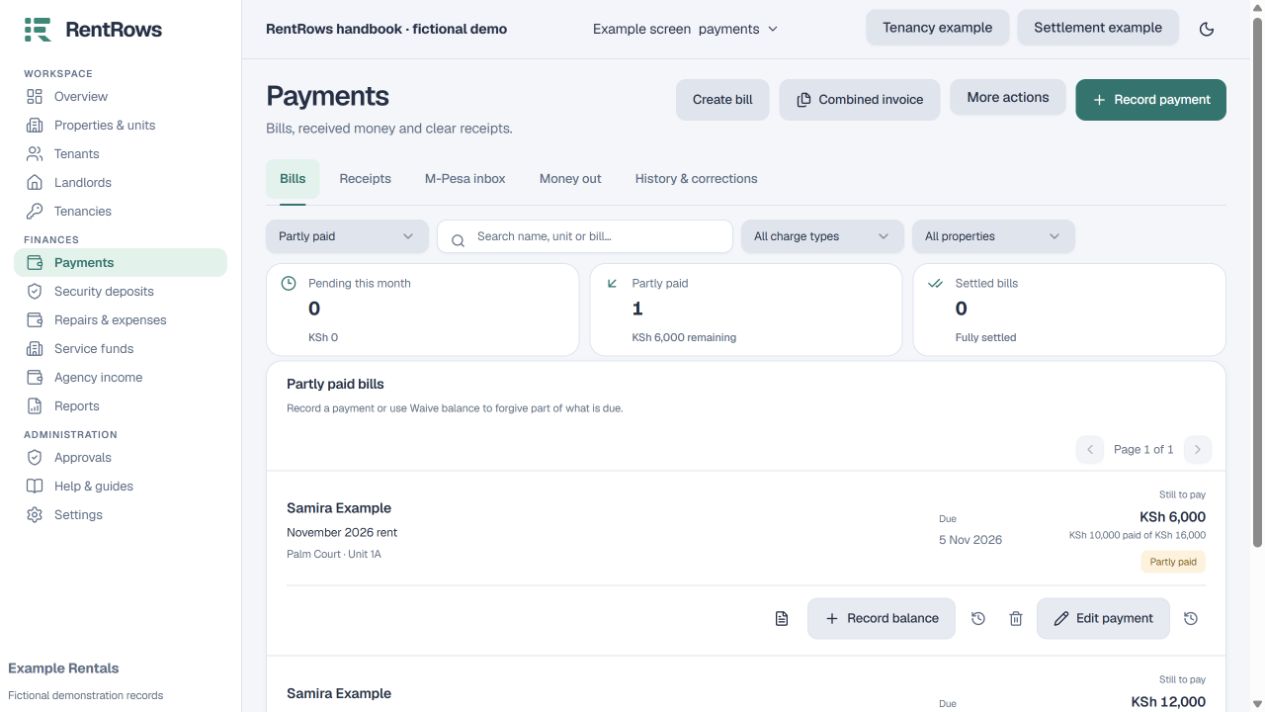
Follow the steps
- 01
Open Bills and search by person, unit or bill. Use the status filter to show unpaid, partly paid, settled or cancelled bills.
- 02
Open a bill to review its type, rent month, due date, original amount, payments and remaining balance.
- 03
Create an additional bill only for a genuine charge not already recorded. Select the correct tenancy and month.
- 04
Use Record payment for actual money. A bill can receive several part payments, and a receipt can be split across bills.
- 05
Use a waiver when debt is forgiven. Cancel a bill only when the charge should not apply. Supply a clear reason and review the resulting balance.
Check the result
The bill’s balance reflects recorded money and valid adjustments.
Keep going
Still need help?
Tell support which screen you are on, what you expected and what happened. Include a bill or receipt number where useful. Never send passwords, payment credentials or email confirmation links.
Contact support →Open your workspace →