Correct mistakes, waive debts and review approvals
Fix the record and its accounting together, with a reason.
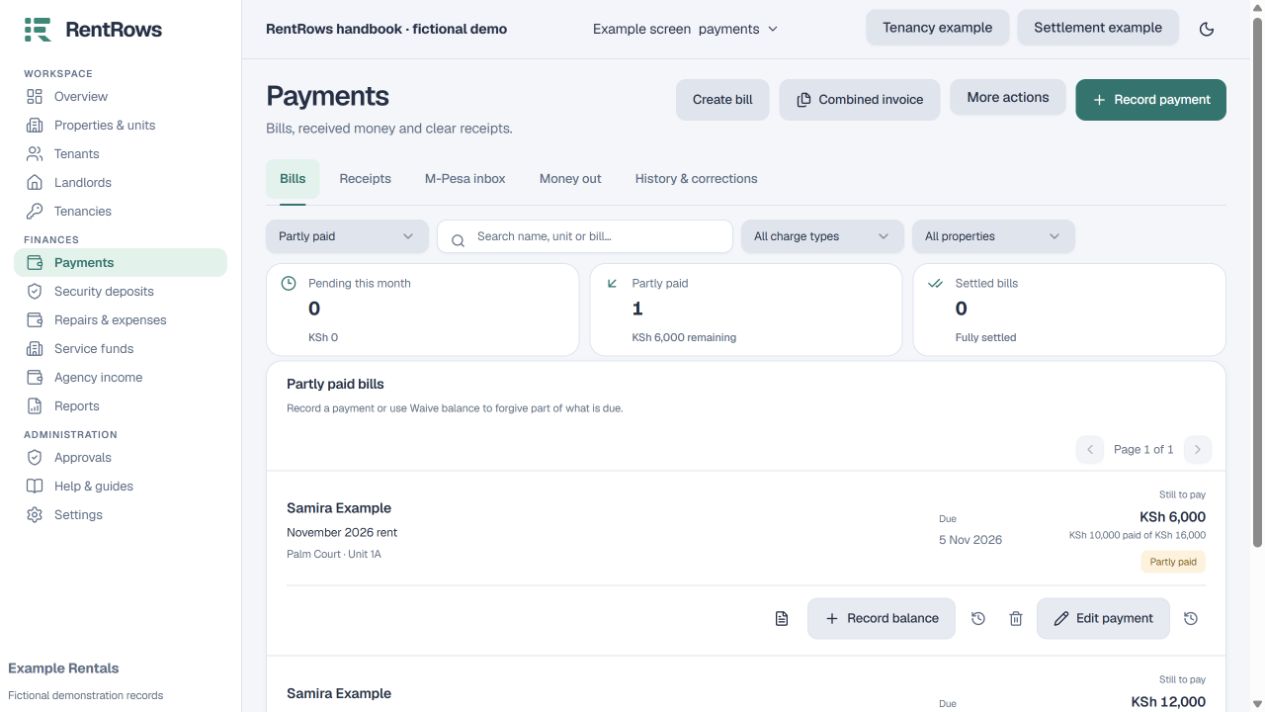
Record → History / Payments → History & corrections
Before you beginCompare the original agreement, payment or statement. Identify exactly what is wrong.
Follow the steps
- 01
Open the affected record and read its history before making a change.
- 02
Choose the appropriate edit, correction, waiver or removal action. Enter a specific reason such as “Bank receipt belongs to December, not November”.
- 03
Read the impact on bill balances, fees, deposits and linked entries before confirming.
- 04
In Agency Team, an employee’s protected money change may wait for admin approval. The admin should review the evidence and approve or reject it.
- 05
Refresh the affected accounts and regenerate documents when needed. Original records and the reason remain in history.
Check the result
Balances reflect the correction and reviewers can see what changed and why.
Keep going
Still need help?
Tell support which screen you are on, what you expected and what happened. Include a bill or receipt number where useful. Never send passwords, payment credentials or email confirmation links.
Contact support →Open your workspace →